Friday, December 10, 2010

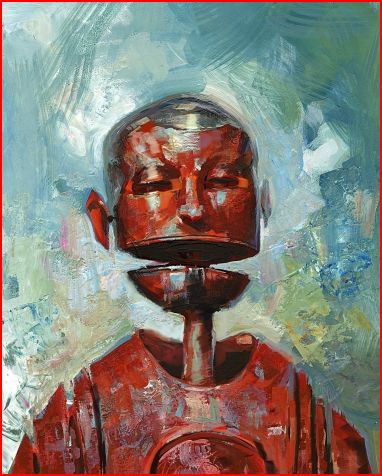
New Artwork: "Embracing our differences" - by Chad Greene

Just completed this last night. This is going to be part of a series of Abstract Expressionist paintings that i'm working on for a gallery showing.

(click the below image to see a larger sized version)

"Embracing our differences" - by Chad Greene


i have been working on this particular piece for about a month (at nights, on weekends, etc) -- and i'm really excited over the results-- i may be on to something! As with most expressionist pieces, it started out very sub-conscious-- just laying down color/values.. then it started to take shape/form.. somewhere in the creation process i started seeing figures emerge and worked on bringing meaning to the central part of the image (figure embracing other shapes). i particularly like the amount of texture and how it works with the shapes and color.. and how each area of the image gives the eye something to rest upon and study.

i had a lot of fun working on this--- sort of 'art therapy' for me, since it's so different from my usual style(s) and from my 'day job!' working on computers all day, making video games!

stay tuned for more! ..and thanks for viewing!

Chad

Saturday, December 4, 2010

The making of artwork, 'Serenity' by Chad Greene (project overview)


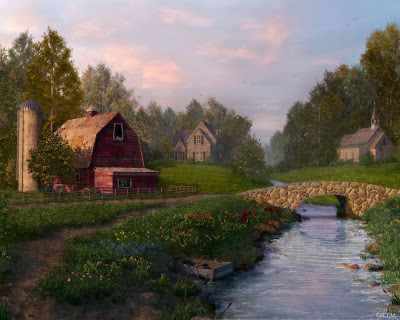
"Serenity" -- by Chad Greene

Recently i was asked about how to use Maya Paint effects to generate foliage in 3D (trees, grass, plants, flowers, etc..) so i referenced this project that i did a few years ago. i won't go into too many technical details and settings here (contact me if you are interested) but i will show some images that show the process of creating this artwork.

This image was done using Maya, After Effects, Photoshop and Deep Paint 3D and it was done in about a month

** click on any of the images to see a larger, more detailed view/image


Initial Layout

this image (below) shows the initial layout curves and main geometry (which is stand in geometry for the moment).
you can see that i was trying to define the curves and shape of the river and the dirt path with these curves.
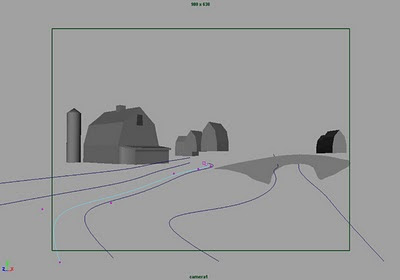


once the curves were drawn and i liked where they were flowing (from the camera's point of view), i then created a poly plane primitive and subdivided it many times. I used the sculpt polygon tool (Maya) to get the shape of the terrain to be what i wanted.

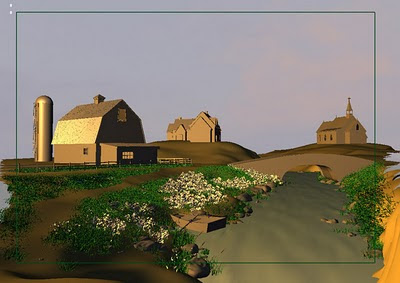
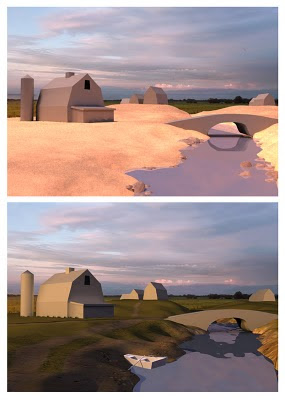
Here are a couple of images which show the scene being developed.. and first pass (very rough) textures being applied -- just to get a sense of color and feel. (the water was just a reflective plane at this point, too)


Objects/props

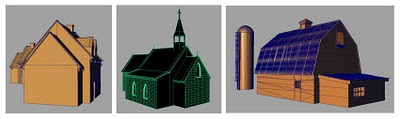
Once the terrain was acceptable-- i moved on to modeling the buildings and major props. All of these objects were 'box modeled' using Maya. (note: i only added details where it was needed and based this on the objects distance from the camera/viewer) i also used displacement maps for the stonework on the house and the chapel-- so the wire frame geo was kept low res, for poly count issues.


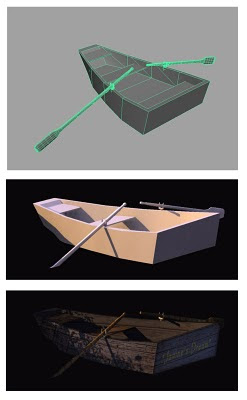
Here's the boat geometry and stages of development:


Organics/foliage (using Paint Effects in Maya)

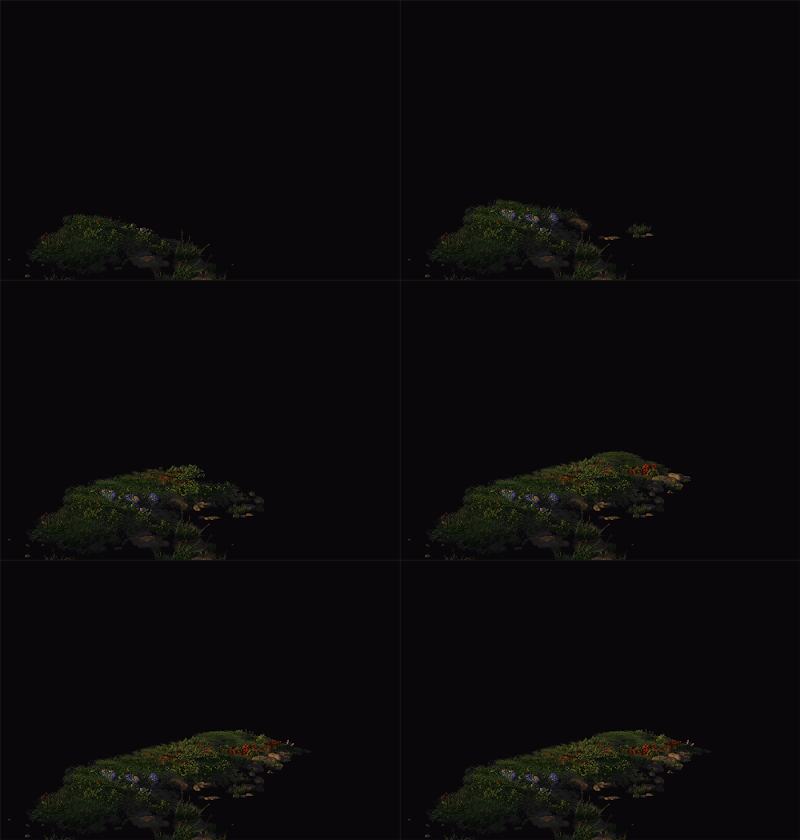
The hardest part of this piece was the grass and misc foliage such as plants, trees, flowers, etc.. -- because of high polygon counts that they caused! all of the grass and flowers totaled over 12 million polygons! (and that is NOT counting the trees!) because of this, i had to render out sections of foliage and later comp then together in after effects.

Below is an animated gif -- that shows some sections and grass and how it was split up into separate layers/renders:

(click this image below to watch as the foliage is composited to 'grow')

For rendering, i wanted to use Mental Ray-- so i had to convert all of the foliage into polygons (because the default Paint Effects nodes will not render otherwise). here are some images which show the wireframe and the rendered out foliage:
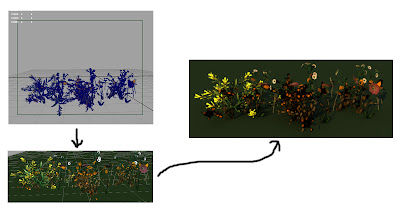
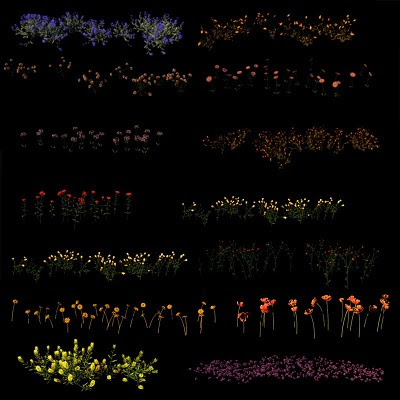

(Above) I created many different types of flowers-- for color and shape variation

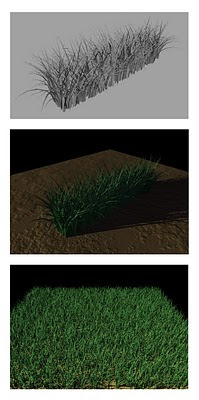
(Below) Here are some examples of polygonal grass-- and how it looks when you 'grow' of plot of it

These were some of the shrubs that i created
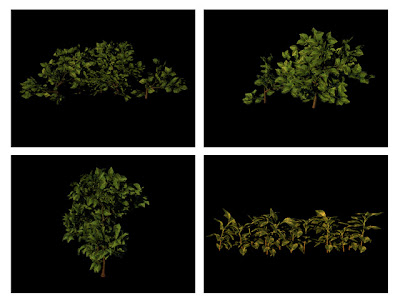

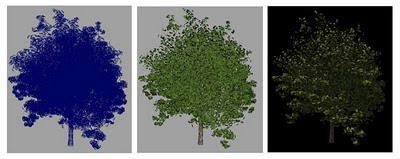
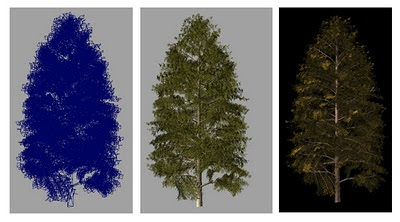
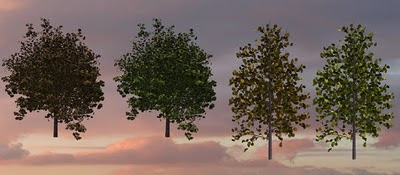
As for the trees: they were created with software called Xfrog (great software, by the way!-- for trees, etc). i created the trees and placed them around the 3D scene.. and i rendered them out in sections (5-8 trees at a time) and then later composited them in the final scene.


Water dynamics and rendering

As for the water-- i first studied how fluid dynamics worked on a simple plane (Maya).. and then i applied what i learned to the river geometry in my scene.. (i also added the rocks and the river bank as collision geo for the simulation to properly calculate the ripples and waves) I then used a modified ocean shader for the material of the water.


Maya Scene file

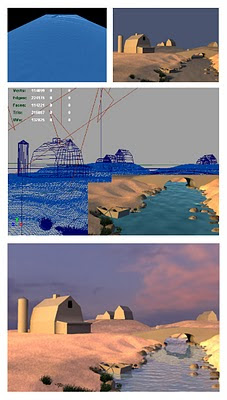
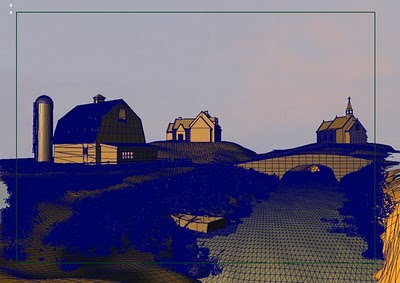
..and finally, here's the environment wire files.. (note: i'm not including the trees, etc.. because most of the work for that involved comping effects and post painting to complete the look)

[The images below were screen captured from Maya's hardware shaded view]


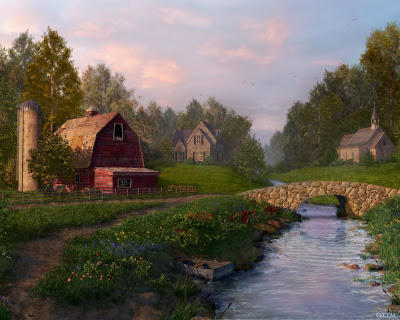
As for the rendering/lighting: it was done in Maya, using Mental Ray. One key light source (sun) was in the scene and all of the bounce lighting came from indirect illumination using a sky dome with sunset colors. Environment fog was used as well to give the scene some atmospheric haze/depth.

Post Painting: i used Photoshop to add the birds in the sky (painted by hand) and also added a slight amount of film grain to the overall image to reduce some of the sharpness.


Final image (click to see larger image)


..Thanks for your time!

Chad Greene-- aka 'Artsy Fartsy'

Wednesday, December 1, 2010

still life - "Jar of Peppers"

this is a painting that i did using Painter 11 and Art Rage Pro v3

i really am liking the software, Art Rage-- for it's natural media oil paints. I am using these oils in combination with the palette knife to create a really thick, impasto looking result.

This painting was then printed 18x24 on canvas, matte medium and sculpting paste was applied.. and then oil paint and oil pastels were applied over the print.

i'll post 'work in progress' images soon.. and even go over some tip/techniques on achieving this look-- stay tuned!

Chad
----------------------------------------------------------
Click on the images below to see a higher resolution image


Artist spotlight - Jon Foster

Jon is one another of my favorite's -- he's well known in the illustration world and has such a great imagination/style.. i just love the way he depicts 'robots!'


Here is a link to his website: http://www.jonfoster.com/#

Here is a link to Amazon, where you can purchase his book (which i have owned for a few years now-- highly recommended!): Revolution: The Art of Jon Foster

Monday, November 22, 2010

Artist Spotlight - John Kenn

..just found this artist today, John Kenn --- these drawings are done on Post-It notes!

very well done, such detail-- love how he depicts 'monsters' !

thanks for the inspiration, John!


website/blog: http://johnkenn.blogspot.com/

Sunday, November 21, 2010

Artist spotlight - Malcolm T. Liepke

Malcolm has been an inspiration to me since college-- i just love how he depicts people, in his figurative work.. wonderful use of color and a style that is unique (unfortunately-- it's copied by others! there are a lot of 'imitators' out there, but only ONE Malcolm T. Liepke!)

He is definitely one of my personal favorite artist's of all-time!


here is a link to his work featured at Arcadia Fine Art: http://arcadiafinearts.com/#/1/1/1/

Malcolm's work on Eleanor Ettinger Gallery: http://www.eegallery.com/cgi-bin/search.cgi?artist=MALCOLM%20T.%20LIEPKE

Here is an interactive collage of some of his work: http://www.vuvox.com/collage/detail/0a8fa695e

..good article/review/interview on Southwest Art: http://www.southwestart.com/articles-interviews/featured-artists/mapping_the_senses

if you are on Facebook-- here is a link to his Home: http://www.facebook.com/pages/Malcolm-Liepke/129846273723427#!/pages/Malcolm-Liepke/129846273723427

Saturday, November 20, 2010

Art Rage -- portrait videos (Ray Tsang)

I've been using Art Rage for nearly a year now-- really impressed with the natural media look/feel-- especially the oil paints! i will be posting some of my artwork using it, very soon..

until then-- i came across this very talented artist, Ray Tsang, who is using it for portraits


click on this link to view the video (you may need a Facebook account):
http://www.facebook.com/video/video.php?v=460159932413#!/video/video.php?v=460159932413

Here is a portrait he did using Corel Painter 11:
http://www.facebook.com/video/video.php?v=460159932413#!/video/video.php?v=423192617413

Here is a link to a forum in which he shows additional portraits: http://www2.ambientdesign.com/forums/showthread.php?t=25550

UPDATE/NEW: Here is a link to his blog: http://raytsangartist.blogspot.com/

Artist spotlight - Craig Mullins

One of my favorite modern artist's-- a legend in the entertainment industry as a concept artist and designer.. he's also the 'Godfather' of speed painting-- which is widely used by most concept artist's to quickly communicate ideas/composition, etc.. i just love his use of texture in his imagery

i had the pleasure of working with him on 2 James Bond games (Agent under fire and Goldeneye: Rogue Agent) -- he did various matte paintings, concepts, etc..


check out his website-- he showcases both traditional and digital paintings: http://www.goodbrush.com/

Ballistic Publishing Grand Master interview: http://www.ballisticpublishing.com/articles/craig_mullins/

here's a video collage of his work on the Marathon trilogy: http://www.youtube.com/watch?v=_bHE5xPzwoE&feature=related

Friday, November 19, 2010

Artist spotlight - Carol Marine

..check out the artwork of Carol Marine! i just love her still life paintings! (the way she applies her paint-- loose brush strokes, choices of color, composition, etc..) i just discovered her work about 6-8 weeks ago, and i'm really glad that i did! she's an amazing/inspiring artist!

here is a link to her blog: http://carolmarine.blogspot.com/

here is a link to her website: http://www.bluecloudstudios.com/

i purchased her book (and recommend it!), available through Blurb.com--- http://www.blurb.com/bookstore/detail/972967

Wednesday, October 27, 2010

'Cherries'

spent about 4-5 hours this past weekend-- working on this still life

Monday, October 18, 2010

..i've really started to focus my time/efforts on getting my work exhibited in gallery shows, competitions, etc.. recently, i entered my work (2 pieces) for consideration into a group show in Bowling Green, Ohio -- and both pieces were accepted! the opening reception was 2 weeks ago-- and the turn-out was great! it was also held during homecoming weekend-- so the town was busy was festivities, etc..

i also entered my work into a call for submissions at a gallery in Danville, IL.. the theme was 'shoes' and i had a painting that i did back in '91 that i dug up.. and re-touched (oils).. i entered it for consideration and it was accepted! Opening night exhibition was this past Friday night and the event went great-- met a lot of people, including a few local artist's.

in my studio, i am actively working on a lot of things! (still lifes, portraits and landscapes) i'm also working on designing a new web site, that will showcase just my fine art (i want to separate my fine art from my professional work, illustration, etc..)

the new site will be: www.chadwgreene.com

anyway-- i'll post pics soon (of the gallery work, etc)

-cg

Wednesday, September 22, 2010

updates

Yes, i'm still around! i've been very busy with my current work project-- i'm the Art Director on a video game called, "Red Faction: Armageddon" -- and it's been a lot of time/work!

i was recently traveling to promote the game (LA, San Diego and Germany) -- and i'll post some links to photos from those press trips-- stay tuned!

i am also working on a new website, specifically to show my 'fine art'

..and finally, i'm working on a FALL art show-- and i have a lot of artwork to post/share (stay tuned)

-cg

Saturday, March 6, 2010

Digital impasto (head study #3)

Here's another digital impasto study that i created


click HERE to view a time lapse workflow process of this piece

Saturday, February 27, 2010

Odd Head study #2


This is another digital head study i did, using Corel Painter 11

Click HERE to view an animated .gif that shows the work being created over time

Sunday, February 21, 2010

Odd head #1 (details/process)

Here is a comparison to the original:


Click HERE to view an animated .gif that shows the work being created over time

Odd Head study #1


One of my favorite artist's is Odd Nerdrum.. i own a few of his over-sized Art books and have always been fascinated by his style/technique (along with his subject matter)

recently, i wanted to replicate his technique in Painter 11.. i started out by spending a lot of time learning the Impasto brushes inside and out-- to the point where i modified them to create my own unique variants.. and then i created a Custom palette with my own brushes.. i spent several weeks created abstract paintings, getting really comfortable with the behaviors, etc.. and then decided to use my learning to create a figurative study of one of his works.

so, over the course of 2 weekends-- i created this (total time approx 22hrs)

If you use/know Painter 11-- i mainly used Thick Oil brushes (modified), Grainy chalk (modified to act as Impasto), various palette knives.. a modified Sargant brush that just applies Impasto and i constantly switch between paper variants (these affect the tooth of the paper)

i plan on creating more of these studies in the future.. i had a lot of fun and learned a ton about creating a digital impasto look!

Saturday, February 20, 2010

Art Rage!

the best $80.00 i've ever spent!

I've been using the software Painter user since it came out (and i'm an expert at using it)--- the recent version, Painter 11 has some good tools and i still use it for my 'fine art/digital paintings'

today i decided to download a trial of Art Rage 3 Pro--- after using it for 2 hours, i bought the full version, for an incredible price of $80 bucks!!?!

i spent almost ALL of today using it-- having a blast!! the final art media is incredibly realistic.. and it's easy to use! i love how the canvas utilizes my full Cintiq screenspace.. and the tools are easily hidden. the canvas papers react very well to the media (and look so real!) and they have this new feature that allows you to 'spray paint' on stickers! (which can be done is a cheesy way-- or done with some style and power-- ala using actual Photoshop .abr brushes!)

here is a link to the software: http://www.artrage.com/artragefeatures.html

try it out! you'll be very surprised at how powerful this software is!

-cg

Welcome!

This is my first post! i will be updating this site often--- adding Artwork, art related links, etc.

I will also be updating this to reflect what i'm up to-- work, personal, etc.

so.. please visit and say hello! :)

Artsy Fartsy