Saturday, January 1, 2011

Project overview/making of: Keebler commercial #1

This is a project i was hired for (freelance) a few years ago -- that involved me creating 3D content for 2 tv commercials to promote the new Keebler EL Fudge cookies, by Nabisco.

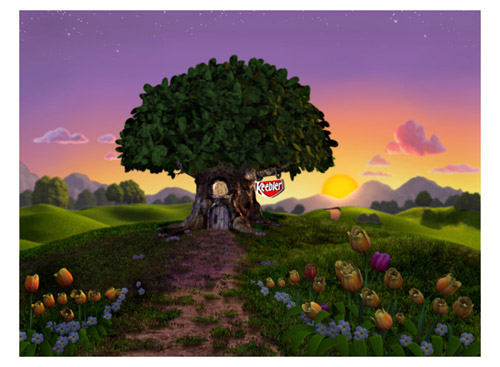
(above) still image from Commercial #1 - "elephant tower"


total time = 2 weeks

client: KaChew! and Nabisco


Commercial #1 --"Elephant tower"

overview: there were 2 scenes i had create-- first was the exterior establishing view of the Tree house, which called for a slow camera zoom, while the sun set in the far distance.. and the flowers needed to animate (closing) during this timelapse sunset. the second scene was an interior shot, of a tower of furniture, that had an elephant standing at the top of this! The elves would then pull the rope, which would cause the elephant to fall down on the peanut butter below, squirting it on to the cookie! i would be responsible for all 3D elements (everything but the 2D hand drawn elves)

Exterior scene
because of the 'style' of the Keebler commercials, i had to create a very stylistic landscape (round background trees, rolling hillsides, stylized flowers, colorful, etc)

(above) - concept art for the landscape


Layers and render passes are your friend
the environment was broken into layers: background (mtns), midground (distant trees/rolling hills), and foreground (Keebler tree, flowers, dirt path and grass) -- each layer was rendered separately (for control and revisions) and then composited together in After Effects

(above) - background mountains


(above) - midground layer and elements
(above) - foreground layer and elements

Props/objects

(above) simple geometry was created for the daises
(above) - English Primroses were created and later animated to close


(above) - concept art for the Keebler tree
(above) - model of the tree made from primitives and sculpted

(above) - 3D tree leaves

(above) - the ground was created from a plane and sculpted in Maya


(above) - Maya's Paint Effects was used to create the grass


(above) - Maya's Paint Effects was used to create the grass; this is how it looks from the camera


(above) - close up of tree/ground
(above) - grass test renders in day/dusk lighting; click image to see larger version


Lighting/animated sunset 
The script called for a quick/timelapse sunset complete with animated foreground flowers that closed during the sunset.

I had to solve how to animate the background sky color, clouds that slowly faded in and changed lighting, shadows and light color that changed over the time and how to animate each flower -- all of this was done using Maya and After Effects


(above) - concept art showing start of sky (midday)


(above) - concept art showing end of sky (sunset)


As the sky becomes dusk-- i had to also fade in stars at the top of the sky; below is the star field i created


The first version of clouds that i created were too realistic for the director, so i then created
these more stylized clouds (below); in After Effects, i animated them fading in and moving across the sky. i also cross-dissolved between multiple versions of the bitmap to create a change in the lighting on the form of the clouds(to be more under-lit as the sun set below them)


The movie below was a test to see how the sky color and sun would animate over time (at this point, the clouds just fade in -- later tests would focus on them moving and changing form with lighting/scale)


Interior scene
Scene 2 involved me creating a bunch of assets that needed to be 'stacked' on top of each other (the cliche-- 'everything but the kitchen sink'-- but in this case, the sink is part of it!) -- i had 1 week to model/texture all of these props and position them accordingly

(below) concept art -- click to see larger version


Props/objects
The objects were modeled in Maya and textured using Photoshop and Bodypaint 3D; after the objects were built and placed in the tower, they then had to be rigged to allow for animation/movement-- as the tower
'swayed' due to the elephants weight on top!

(click any of the images below to see a larger image)


Final 30 second tv commercial
..and here it is! (thanks for your time) - Chad


Happy New Year 2011!!!

Happy New Year, everyone! let's all make this the most creative year yet!

starting today, i pledge to create a new piece of art every day of 2011 -- i will be posting these daily creations here (starting today-- stay tuned) -- they will be in the form of paintings, sketches, photography, etc.. basically, something art-related and creative!

Cheers!

Chad

Wednesday, December 29, 2010

Artist spotlight - Odd Nerdrum

i discovered his work about 10 yrs ago-- and immediately bought as many of his books as i could find! i wanted to learn about him and his techniques.. i am fascinated by his subject matter and his old master style (which is influenced by Caravaggio and Rembrandt.


born in Hälsingborg, Sweden in 1944, I would characterize Odd Nerdrum as a true genius, a master painter of the human body and a true humanist.  A great Kitsch painter!  His paintings reach the souls of humanity. His paintings are a universal language.  His paintings feel alive.  He paints life and death for all to see.


The Nerdrum Institute

Google image search for Odd Nerdrum 

Wikipedia link

Sunday, December 26, 2010

Posemaniacs.com

Posemaniacs.com is a GREAT website for studying the figure!


i draw almost daily from this site-- using their 30 second poses (which has a timer and can also do 60 second, 90 seconds, etc) -- and it randomly chooses male/female poses

This site also has resources for drawing hands/heads (you can rotate the model in the web viewer, too!)

and finally-- this is available on the iPhone as a free app!

timed poses link: http://www.posemaniacs.com/pose/thirtysecond.html

random pose viewer: http://www.posemaniacs.com/pose/randomviewer.html

3D model viewer (choose from models on the Right side): http://www.posemaniacs.com/tools/handviewer/

Negative space model viewer: http://www.posemaniacs.com/pose/negativespace.html

Saturday, December 25, 2010

New 'Facebook page' for Chad W Greene

Merry Christmas!

i have created a new Facebook page, to be used for promoting my artwork (and to provide updates, info, etc)

 Here is a link to view this:  http://www.facebook.com/pages/Chad-W-Greene-Artist/150897448295544?v=wall

Click the 'Like' button on the Facebook page to receive info, updates, etc.

thanks!

Chad

Wednesday, December 22, 2010

Artist Spotlight - Andrew (android) Jones

Andrew Jones is a true modern day visionary artist that inspires this generation of digital artist's with his work and his teachings.. he is one of the founders of the successful studio, Massive Black


Andrew has also been traveling the world, experiencing different cultures and creating awesome artwork along the way! in addition to his own work, he finds time to teach workshops, post demo's online of his techniques (which have influenced thousands of artist's, including myself) and he does live painting at clubs and events-- while the DJ spins the music (and he states that the music and people influence the final piece)

Andrew Jones website

Google image search of his work: Andrew Jones

if you are involved in creating digital art (or just like to be inspired watching a very creative person in action!) check out these training videos-- HIGHLY recommended! -- LINK to videos

you can also find him posting live on the community site, Conceptart.org (which i'll be giving a 'shout out' to very soon in other post-- as it's one of the best art sites out anywhere!)

Friday, December 17, 2010

Artist Spotlight - Richard Schmid

Gosh-- how to even present such a MASTER!? Richard is an inspiration to ALL who view his work-- both collectors and definitely artist's that know of him! he's a living legend and someday will be studied in Art History alongside the other legends of Art.. he's that good!


he's been an inspiration to me for 15 yrs or more (when i first discovered him).. everything he creates is full of life/energy.. such amazing knowledge of color, masterful brushstrokes, etc.. my words just won't do his work justice.. see for yourself if  you haven't already!

..man, what i would give to study with such as master!?! :)

link to his website: http://www.richardschmid.com/default.htm

link to DVD's: highly recommended  (i own 6 of them-- very useful):
http://www.richardschmid.com/video.html

books/catalogues: http://www.richardschmid.com/book.html

google image search of his work: Google image

Thursday, December 16, 2010

Figure studies #01

Below is a page of 60 second figure studies, by Chad W Greene

(click the image to view a larger version)


below is a YouTube video that shows the process of creating this image
(click to play)
note: this video was sped up 2.5x for playback purposes

---
Just as athletes and or skilled professionals, artist's (musicians, dancers, actors, etc) must practice their craft to get better. Artist's have long used figure drawing studies as a way of training the hand/eye coordination needed (in all aspects of fine art);

during art school, we would spend hours in class drawing/painting from live models.. once we graduate, it gets harder to find this much needed means of training (you have to find art associations, attend workshops, etc) or draw from reference books. portrait artist's will hire models to pose for them live at their studios-- but this takes money and the initiative to make this commitment.

at my company, Volition-- we are fortunate, at times, to have weekly figure drawing classes (5-8pm) once a week, in which we hire a local model that comes in to our office. (i'll post some sketches from these classes at some point)

anyway-- as for me, i try and find time to practice, at least 3-4 days a week-- drawing from reference books, etc.. i plan on posting these studies here for you to view.. most of my studies are 45 second and 60 second poses (nothing longer than 90 seconds) -- and this is great practice for studying weight/form, etc.. these studies are done both digitally and in my sketchbook using mostly pencil (although i will use ink washes, charcoal, etc.. as well)

more to come-- check back!

Blog title changed

as you may notice, i switched my blog name/title to 'Chad W Greene' and no longer am using my online artist nickname, 'Artsy Fartsy'..

the reason being that i have been reading a lot of articles/ediorials and talking to others about the importance of building your identity as YOURSELF.. and i want my artwork to be synonymous with Chad W Greene and not Artsy Fartsy

nevertheless-- it's still ME! :)

i have also registered a website: www.chadwgreene.com and i'm the process of building it up to be focused on my fine art exclusively (it won't have my illustrations or professional CG work) and will be used on business cards and communication with galleries, collectors, etc.. stay tuned for that!

Cheers!

Chad

'Inside the studio' -- art studio pics

I just love seeing photos of artist's studios.. it's nice to see where they create their masterpieces and what their space is like.. as for mine, it's in the basement of my home (wish it were above ground-- with Northern light windows.. but it is where it is and it works out well for me! ..maybe someday i'll have the dream studio! :)

Here are a few pics of my art studio.. (more to come-- i plan on taking a 360 pano pic as well)

size of studio is approx 12x24 and has a bathroom/sink as well


(Above) one view of the corner of my studio; you can see the
painting, 'Cherries' on the easel


(above) misc props on my shelf


(Above) just finished this painting, 'Peppers,' mixed media, 18x24


above - 'tools of the trade' (oils and oil pastels)

Wednesday, December 15, 2010

Artist Spotlight - Feng Zhu

Feng Zhu is a concept artist/designer that has been working professionally for over 11 yrs now -- working on games, films and other forms of entertainment and industrial design (for companies such as: Microsoft, Electronic Arts, Sony, Activision, Industrial Light+Magic, NCSoft, Warner Brothers, Lucasfilm, Bay Films, Epic Games, and many other top studios)

He also started his own design school -- http://www.fengzhudesign.com/ which has tons of good information/training, etc.. i especially want to point you to his videos, which are streamed from YouTube, in which he discusses student works and how to make them better..


check out his artwork/portfolio here: http://www.fengzhudesign.com/portfolio.html

check out his design school here: http://www.fengzhudesign.com/index.html

check out his YouTube training/insight videos here: http://www.youtube.com/FZDSCHOOL

Friday, December 10, 2010

New Artwork: "Embracing our differences" - by Chad Greene

Just completed this last night. This is going to be part of a series of Abstract Expressionist paintings that i'm working on for a gallery showing.

(click the below image to see a larger sized version)

"Embracing our differences" - by Chad Greene


i have been working on this particular piece for about a month (at nights, on weekends, etc) -- and i'm really excited over the results-- i may be on to something! As with most expressionist pieces, it started out very sub-conscious-- just laying down color/values.. then it started to take shape/form.. somewhere in the creation process i started seeing figures emerge and worked on bringing meaning to the central part of the image (figure embracing other shapes). i particularly like the amount of texture and how it works with the shapes and color.. and how each area of the image gives the eye something to rest upon and study.

i had a lot of fun working on this--- sort of 'art therapy' for me, since it's so different from my usual style(s) and from my 'day job!' working on computers all day, making video games!

stay tuned for more! ..and thanks for viewing!

Chad

Saturday, December 4, 2010

The making of artwork, 'Serenity' by Chad Greene (project overview)


"Serenity" -- by Chad Greene

Recently i was asked about how to use Maya Paint effects to generate foliage in 3D (trees, grass, plants, flowers, etc..) so i referenced this project that i did a few years ago. i won't go into too many technical details and settings here (contact me if you are interested) but i will show some images that show the process of creating this artwork.

This image was done using Maya, After Effects, Photoshop and Deep Paint 3D and it was done in about a month

** click on any of the images to see a larger, more detailed view/image


Initial Layout

this image (below) shows the initial layout curves and main geometry (which is stand in geometry for the moment).
you can see that i was trying to define the curves and shape of the river and the dirt path with these curves.


once the curves were drawn and i liked where they were flowing (from the camera's point of view), i then created a poly plane primitive and subdivided it many times. I used the sculpt polygon tool (Maya) to get the shape of the terrain to be what i wanted.

Here are a couple of images which show the scene being developed.. and first pass (very rough) textures being applied -- just to get a sense of color and feel. (the water was just a reflective plane at this point, too)


Objects/props

Once the terrain was acceptable-- i moved on to modeling the buildings and major props. All of these objects were 'box modeled' using Maya. (note: i only added details where it was needed and based this on the objects distance from the camera/viewer) i also used displacement maps for the stonework on the house and the chapel-- so the wire frame geo was kept low res, for poly count issues.


Here's the boat geometry and stages of development:


Organics/foliage (using Paint Effects in Maya)

The hardest part of this piece was the grass and misc foliage such as plants, trees, flowers, etc.. -- because of high polygon counts that they caused! all of the grass and flowers totaled over 12 million polygons! (and that is NOT counting the trees!) because of this, i had to render out sections of foliage and later comp then together in after effects.

Below is an animated gif -- that shows some sections and grass and how it was split up into separate layers/renders:

(click this image below to watch as the foliage is composited to 'grow')


For rendering, i wanted to use Mental Ray-- so i had to convert all of the foliage into polygons (because the default Paint Effects nodes will not render otherwise). here are some images which show the wireframe and the rendered out foliage:


(Above) I created many different types of flowers-- for color and shape variation

(Below) Here are some examples of polygonal grass-- and how it looks when you 'grow' of plot of it


These were some of the shrubs that i created


As for the trees: they were created with software called Xfrog (great software, by the way!-- for trees, etc). i created the trees and placed them around the 3D scene.. and i rendered them out in sections (5-8 trees at a time) and then later composited them in the final scene.


Water dynamics and rendering

As for the water-- i first studied how fluid dynamics worked on a simple plane (Maya).. and then i applied what i learned to the river geometry in my scene.. (i also added the rocks and the river bank as collision geo for the simulation to properly calculate the ripples and waves) I then used a modified ocean shader for the material of the water.


Maya Scene file

..and finally, here's the environment wire files.. (note: i'm not including the trees, etc.. because most of the work for that involved comping effects and post painting to complete the look)

[The images below were screen captured from Maya's hardware shaded view]


As for the rendering/lighting: it was done in Maya, using Mental Ray. One key light source (sun) was in the scene and all of the bounce lighting came from indirect illumination using a sky dome with sunset colors. Environment fog was used as well to give the scene some atmospheric haze/depth.

Post Painting: i used Photoshop to add the birds in the sky (painted by hand) and also added a slight amount of film grain to the overall image to reduce some of the sharpness.


Final image (click to see larger image)


..Thanks for your time!

Chad Greene-- aka 'Artsy Fartsy'

Wednesday, December 1, 2010

still life - "Jar of Peppers"

this is a painting that i did using Painter 11 and Art Rage Pro v3

i really am liking the software, Art Rage-- for it's natural media oil paints. I am using these oils in combination with the palette knife to create a really thick, impasto looking result.

This painting was then printed 18x24 on canvas, matte medium and sculpting paste was applied.. and then oil paint and oil pastels were applied over the print.

i'll post 'work in progress' images soon.. and even go over some tip/techniques on achieving this look-- stay tuned!

Chad
----------------------------------------------------------
Click on the images below to see a higher resolution image


Artist spotlight - Jon Foster

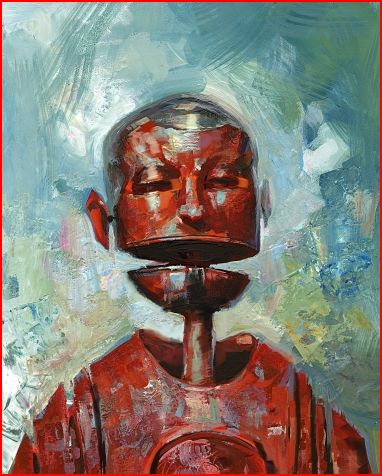
Jon is one another of my favorite's -- he's well known in the illustration world and has such a great imagination/style.. i just love the way he depicts 'robots!'


Here is a link to his website: http://www.jonfoster.com/#

Here is a link to Amazon, where you can purchase his book (which i have owned for a few years now-- highly recommended!): Revolution: The Art of Jon Foster

Monday, November 22, 2010

Artist Spotlight - John Kenn

..just found this artist today, John Kenn --- these drawings are done on Post-It notes!

very well done, such detail-- love how he depicts 'monsters' !

thanks for the inspiration, John!


website/blog: http://johnkenn.blogspot.com/

Sunday, November 21, 2010

Artist spotlight - Malcolm T. Liepke

Malcolm has been an inspiration to me since college-- i just love how he depicts people, in his figurative work.. wonderful use of color and a style that is unique (unfortunately-- it's copied by others! there are a lot of 'imitators' out there, but only ONE Malcolm T. Liepke!)

He is definitely one of my personal favorite artist's of all-time!


here is a link to his work featured at Arcadia Fine Art: http://arcadiafinearts.com/#/1/1/1/

Malcolm's work on Eleanor Ettinger Gallery: http://www.eegallery.com/cgi-bin/search.cgi?artist=MALCOLM%20T.%20LIEPKE

Here is an interactive collage of some of his work: http://www.vuvox.com/collage/detail/0a8fa695e

..good article/review/interview on Southwest Art: http://www.southwestart.com/articles-interviews/featured-artists/mapping_the_senses

if you are on Facebook-- here is a link to his Home: http://www.facebook.com/pages/Malcolm-Liepke/129846273723427#!/pages/Malcolm-Liepke/129846273723427

Saturday, November 20, 2010

Art Rage -- portrait videos (Ray Tsang)

I've been using Art Rage for nearly a year now-- really impressed with the natural media look/feel-- especially the oil paints! i will be posting some of my artwork using it, very soon..

until then-- i came across this very talented artist, Ray Tsang, who is using it for portraits


click on this link to view the video (you may need a Facebook account):
http://www.facebook.com/video/video.php?v=460159932413#!/video/video.php?v=460159932413

Here is a portrait he did using Corel Painter 11:
http://www.facebook.com/video/video.php?v=460159932413#!/video/video.php?v=423192617413

Here is a link to a forum in which he shows additional portraits: http://www2.ambientdesign.com/forums/showthread.php?t=25550

UPDATE/NEW: Here is a link to his blog: http://raytsangartist.blogspot.com/

Artist spotlight - Craig Mullins

One of my favorite modern artist's-- a legend in the entertainment industry as a concept artist and designer.. he's also the 'Godfather' of speed painting-- which is widely used by most concept artist's to quickly communicate ideas/composition, etc.. i just love his use of texture in his imagery

i had the pleasure of working with him on 2 James Bond games (Agent under fire and Goldeneye: Rogue Agent) -- he did various matte paintings, concepts, etc..


check out his website-- he showcases both traditional and digital paintings: http://www.goodbrush.com/

Ballistic Publishing Grand Master interview: http://www.ballisticpublishing.com/articles/craig_mullins/

here's a video collage of his work on the Marathon trilogy: http://www.youtube.com/watch?v=_bHE5xPzwoE&feature=related

Friday, November 19, 2010

Artist spotlight - Carol Marine

..check out the artwork of Carol Marine! i just love her still life paintings! (the way she applies her paint-- loose brush strokes, choices of color, composition, etc..) i just discovered her work about 6-8 weeks ago, and i'm really glad that i did! she's an amazing/inspiring artist!

here is a link to her blog: http://carolmarine.blogspot.com/

here is a link to her website: http://www.bluecloudstudios.com/

i purchased her book (and recommend it!), available through Blurb.com--- http://www.blurb.com/bookstore/detail/972967

Wednesday, October 27, 2010

'Cherries'

spent about 4-5 hours this past weekend-- working on this still life

Monday, October 18, 2010

..i've really started to focus my time/efforts on getting my work exhibited in gallery shows, competitions, etc.. recently, i entered my work (2 pieces) for consideration into a group show in Bowling Green, Ohio -- and both pieces were accepted! the opening reception was 2 weeks ago-- and the turn-out was great! it was also held during homecoming weekend-- so the town was busy was festivities, etc..

i also entered my work into a call for submissions at a gallery in Danville, IL.. the theme was 'shoes' and i had a painting that i did back in '91 that i dug up.. and re-touched (oils).. i entered it for consideration and it was accepted! Opening night exhibition was this past Friday night and the event went great-- met a lot of people, including a few local artist's.

in my studio, i am actively working on a lot of things! (still lifes, portraits and landscapes) i'm also working on designing a new web site, that will showcase just my fine art (i want to separate my fine art from my professional work, illustration, etc..)

the new site will be: www.chadwgreene.com

anyway-- i'll post pics soon (of the gallery work, etc)

-cg

Wednesday, September 22, 2010

updates

Yes, i'm still around! i've been very busy with my current work project-- i'm the Art Director on a video game called, "Red Faction: Armageddon" -- and it's been a lot of time/work!

i was recently traveling to promote the game (LA, San Diego and Germany) -- and i'll post some links to photos from those press trips-- stay tuned!

i am also working on a new website, specifically to show my 'fine art'

..and finally, i'm working on a FALL art show-- and i have a lot of artwork to post/share (stay tuned)

-cg